
Product SKU Generator for WooCommerce
Wordpress plugin
App Details
Requires: WooCommerce 3.9.4 or newer
Automatically generate a SKU for parent / simple products, variations, or both when the product is published or updated.
IMPORTANT: The SKU field will be disabled for SKUs being generated by the plugin. Your own previously created SKUs will be overridden if you update a product while generating SKUs, and they will change if you change your product slug (while using this to generate them). Be sure you want to complete automate SKUs if you leave this enabled all of the time.
You can also selectively enable and disable the plugin if you don’t want to override existing SKUs when saving products. You can view product documentation for help.
Automated SKUs
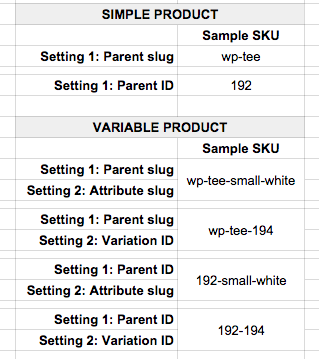
SKUs for simple, external, or parent products can be generated from the product’s slug (hyphenated name) or ID. For example, a product with the slug wp-tee-shirt can have a SKU of wp-tee-shirt or 192 (whatever the product’s ID is). This SKU will be generated any time the product is published or updated.
If the product is a variable product, this plugin can also generate SKUs for the product variations if desired (these typically inherit the parent SKU). Variation SKUs can either append attribute slugs or variation IDs for each variation to the parent SKU.
Here are some samples of different SKU formats that can be created with this plugin.
You can also manually set simple / parent SKUs, or manually set the variation SKUs, if you don’t want the plugin to generate them for you.
Features
This plugin provides options to:
- automatically generate simple / parent product SKUs when the product is published or updated
- generate simple / parent product SKUs using the product slug or ID
- automatically generate SKUs for product variations when the product is published or updated
- generate variation SKUs using the attribute slugs or variation ID
- use the bulk product update action to easily force SKU generation for more than one product — handy to bulk-generate SKUs for products created before installing this plugin
SKUs for all product types
The Product SKU Generator for WooCommerce lets you determine which SKUs should be generated automatically, and whether these SKUs should use product slugs or IDs. If a SKU is generated, the input for that SKU will be disabled since you cannot adjust it.
If you choose not to generate a SKU, then you can enter your own SKU. For example, if you only generate variation SKUs, then you can enter a parent product SKU. This will be used as the base for your generated variation SKUs, and slugs or IDs will be appended to it.
If you only create parent / simple SKUs, you will be able to manually create your own variation SKUs, as these will not be overridden by saving or updating a product.
Bulk Updating
You can bulk add SKUs to products that you’ve created prior to installing this plugin. If you select the products you want to update, then bulk edit them, all you have to do is hit “Update”. When the products are saved, SKUs will be generated for all products.
This action will also automatically generate the SKUs for product variations if you have them enabled.
More Details
- See the product page for full details and documentation
- View more of SkyVerge’s free WooCommerce extensions
- View all WooCommerce extensions from SkyVerge
Translations
The plugin text domain is: woocommerce-product-sku-generator
Attribute Names
By default, if you have an attribute name with a space (such as “Burnt Marshmallow” for color), the SKU will use this exact formatting. A SKU for this variation would look like: parentSKU-Burnt Marshmallow
If you enable the setting to replace spaces, this will instead look like: parentSKU-Burnt_Marshmallow or parentSKU-Burnt-Marshmallow — depending on which setting you’ve chose. This is helpful if your external fulfillment service does not allow spaces in SKUs.
Attribute Sorting
In very rare cases, you may find that variation SKUs do not sort attributes in the same order. For example, one variation may be tee-shirt-large-black, and another could be tee-shirt-black-medium.
If this occurs, you can force attributes to sort themselves consistently before generating the SKU, which will resolve this problem. You could also consider this for new installations.
Be sure you want to enable this if you have existing SKUs, as variation SKUs that were generated previously could be overridden while updating a product – they’ll be re-generated with the forced attribute order.
To force attribute sorting, add this code snippet where you add your site modifications, such as a custom plugin or theme’s functions.php:
add_filter( 'wc_sku_generator_force_attribute_sorting', '__return_true' );
Pricing
Starting from $0 per month.
App Info
Rating
Reviewers
19 reviews
Tags
Developed By
SkyVerge
Quick & Easy
Find the Best Wordpress plugins for you
Common Ninja has a large selection of powerful Wordpress plugins that are easy to use, fully customizable, mobile-friendly and rich with features — so be sure to check them out!
Testimonial
Testimonial plugins for Wordpress
Galleries
Galleries plugins for Wordpress
SEO
SEO plugins for Wordpress
Contact Form
Contact Form plugins for Wordpress
Forms
Forms plugins for Wordpress
Social Feeds
Social Feeds plugins for Wordpress
Social Sharing
Social Sharing plugins for Wordpress
Events Calendar
Events Calendar plugins for Wordpress
Sliders
Sliders plugins for Wordpress
Analytics
Analytics plugins for Wordpress
Reviews
Reviews plugins for Wordpress
Comments
Comments plugins for Wordpress
Portfolio
Portfolio plugins for Wordpress
Maps
Maps plugins for Wordpress
Security
Security plugins for Wordpress
Translation
Translation plugins for Wordpress
Ads
Ads plugins for Wordpress
Video Player
Video Player plugins for Wordpress
Music Player
Music Player plugins for Wordpress
Backup
Backup plugins for Wordpress
Privacy
Privacy plugins for Wordpress
Optimize
Optimize plugins for Wordpress
Chat
Chat plugins for Wordpress
Countdown
Countdown plugins for Wordpress
Email Marketing
Email Marketing plugins for Wordpress
Tabs
Tabs plugins for Wordpress
Membership
Membership plugins for Wordpress
popup
popup plugins for Wordpress
SiteMap
SiteMap plugins for Wordpress
Payment
Payment plugins for Wordpress
Coming Soon
Coming Soon plugins for Wordpress
Ecommerce
Ecommerce plugins for Wordpress
Customer Support
Customer Support plugins for Wordpress
Inventory
Inventory plugins for Wordpress
Video Player
Video Player plugins for Wordpress
Testimonials
Testimonials plugins for Wordpress
Tabs
Tabs plugins for Wordpress
Social Sharing
Social Sharing plugins for Wordpress
Social Feeds
Social Feeds plugins for Wordpress
Slider
Slider plugins for Wordpress
Reviews
Reviews plugins for Wordpress
Portfolio
Portfolio plugins for Wordpress
Membership
Membership plugins for Wordpress
Forms
Forms plugins for Wordpress
Events Calendar
Events Calendar plugins for Wordpress
Contact
Contact plugins for Wordpress
Comments
Comments plugins for Wordpress
Analytics
Analytics plugins for Wordpress
Common Ninja Apps
Some of the best Common Ninja plugins for Wordpress
Browse our extensive collection of compatible plugins, and easily embed them on any website, blog, online store, e-commerce platform, or site builder.

YouTube Slider
Show YouTube videos with a YouTube slider that displays clips in a smooth, customizable layout to boost engagement.

Messenger Conversation
Show Messenger conversations on your website in a clear, authentic chat format.

Business Listings
Create business listings with a listings widget that presents companies clearly, supports easy organization, and helps visitors find the right services quickly.

Image Slider
Showcase visuals with an image slider that displays multiple images in a smooth slideshow, improves design, and keeps visitors engaged.

World Clock
Display multiple time zones with a world clock widget that offers clear global times, customizable styles, and a responsive design for better user experience.

Pricing Slider
Use a pricing slider to show dynamic prices by quantity, help visitors compare options, and support confident purchases.

Glassdoor Reviews
Show Glassdoor reviews to highlight employee feedback, strengthen employer brand, and help candidates trust your company.

Instagram Slider
Add an Instagram slider to your site to display social posts dynamically and keep your visual content engaging and current.

Restaurant Menu List
Create a clear restaurant menu list that helps visitors explore dishes easily, understand key details, and make confident ordering decisions that support conversions.

Social Proof Avatars
Display social proof avatars that show user activity and ratings, build trust instantly, and help visitors feel confident about your credibility.

Form Builder
Create custom forms with a form builder that offers advanced field types, easy layout control, and flexible options for any purpose.

Job Listings
Create job listings with a jobs board widget that lets you post openings, manage roles easily, and help candidates find the right positions quickly.


Discover Apps By Platform
Discover the best apps for your website







Common Ninja Search Engine
The Common Ninja Search Engine platform helps website builders find the best site widgets, apps, plugins, tools, add-ons, and extensions! Compatible with all major website building platforms - big or small - and updated regularly, our Search Engine tool provides you with the business tools your site needs!
